Carbonite | Partner Portal Redesign
The Client
Carbonite is a data backup and protection service provider that offers cloud/server backup, migration, and recovery solutions.
The Brief
Carbonite’s mid-market partner program has gone through many changes prior to this project, including a redesign & re-platform onto Relayware (a partner relationship management software). Unfortunately, Relayware was not a scalable solution and led to complications and a poor user experience - on average, users were spending less than 2 minutes on the portal.
In addition to migrating the partner portal onto Episerver, Carbonite wanted to make sure the new design was strategic and catered to their partners’ needs. Beyond streamlining and making sure transactional actions were easy to accomplish, Carbonite also wanted to explore other content opportunities to promote user engagement.
Audience
Mid-market sales and technical partners. These partners sell or build Carbonite solutions for other businesses.
Solution
Through partner interviews and persona development, we better understood the goals and needs of Carbonite’s sales and technical partners. By doing so, we ensured that the end design of the portal was strategic and could prove useful for their audience.
We streamlined existing key transactional flows for registering an account, registering a deal, and getting certified.
We defined a new site structure and taxonomy system that better mapped to their partners’ goals.
Client:
Carbonite
Business Model:
B2B
Team:
• Strategy – Brendon Buckley
• Analytics – Cora Lin
• UX – Jess Chow, Meredith Sloan
• Visual Design – Steve Yaffe, Voice & Reason
• Creative Direction – Laura Tirado
• Front-end Dev – Ryan Brooks, Patrick Connors
• Back-end (Episerver) Dev – Tim Dufour, Matt Schroer
• Production – Mary-Ann DiThomas, Nicole Heffernan
• Account – Joanna Field
UX Deliverables:
• Task/System Workflows
• Sitemap
• Taxonomy
• Wireframes
• Functional Specification
The Design Process
Business Goals - Summary
Persona Profile - Sales Executive (VAR)
Strategic Insight - Dashboard
Approach
As a first step, we conducted stakeholder interviews to uncover Carbonite’s primary goals that would define success for the new portal.
Through user (partner) interviews, we developed persona segments, where we outlined scenarios and content that would map to their needs. From there, the strategist conducted a scoring exercise to determine content and conversion interests, which ultimately helped me determine content priority for each persona during UX design.
Strategic Recommendations
Through stakeholder interviews, partner interviews and persona development, we uncovered 5 key strategic themes:
Create “sales playbooks” - intelligent, personalized packages of sales enablement content that can support partners through their sales process.
Streamline the permissions model from 65+ different permutations to focus on the core 7 personas, with secondary segmentation. Personalize content to these core personas based on their profiles in Salesforce.
Learning content, such as training & certifications, is not a top desire for most partners. Ensure that partners can easily and quickly achieve certification and that learning content does not cause friction in the user journey.
Create a dashboard experience that surfaces the most relevant content to partners. They have limited time and need a quick and efficient experience.
Regionalization and translation need to be considered. Ensure taxonomy aligns to each region so that related content can be surfaced and suppressed according to the specific interests and desires of regional partners.
Task/System Workflows
There were 3 key task/system flows that needed to be outlined for the development team to ensure that we are not only streamlining these processes from a UX perspective, but that we were also clearly outlining where there would be technical integrations, since data will be living in disparate areas.
Register an account - when does a Salesforce request get created? When does an email get triggered?
Register a deal - when does a lead become an opportunity and when does that get updated in Salesforce? When does Carbonite get a notification for approval or rejection?
Get Certified - how does information about specializations/certifications get passed through from Classmarker to Epi/Salesforce?
Sitemap - Logged Out
Sitemap - Logged In
Sitemap
Prior to creating a sitemap, I conducted a manual content audit so that I was able to holistically account for all pages on the current portal in our new design. I worked with the analytics manager to layer on page analytics to see what pages were or were not popular.
From the content audit, the content scoring exercise and our strategic insights, I was able to create a sitemap that aligned to our users, the business, and existing content.
The existing portal was a gated website where users must log in to view any content. I wanted to take this opportunity to create additional pages in the ungated experience to inform potential partners about the partner program, to provide value proposition and to push them to join.
Taxonomy
As we established the site structure, we began to think about content relationships - and started to define a taxonomy system for the portal.
It was important to think through categories that mapped to different mindsets. For example, for partners who are familiar with Carbonite, allow them to filter content by product. For partners who are not, allow them to filter content by solution - with language that is more easily understandable. We also had to ensure to think through facets for certification, training, resources, etc.
Taxonomy
Wireframe - Dashboard (Sales)
Interactive Wireframe Prototype
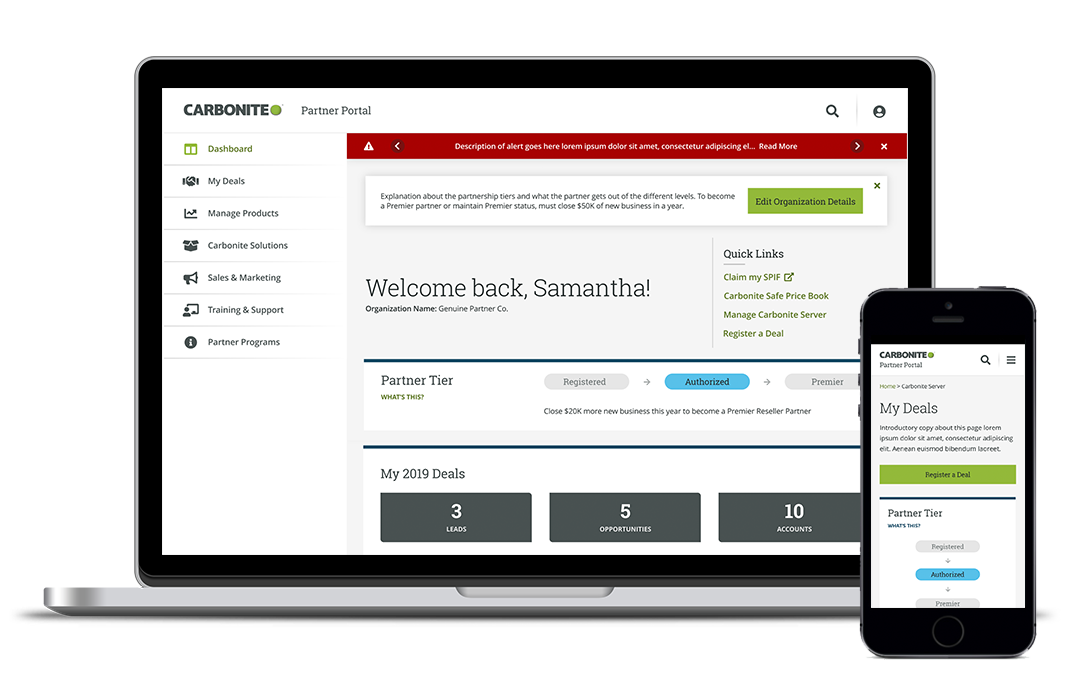
Because this was a transactional portal, it was important to create wireframes for every single page, to make sure that specific content, functionality, and integration points were defined on a page-by-page basis. Another UX designer and I created a total of 71 responsive wireframes for Day 1 launch.
Functional Specification
To hand off to the development team, I put together functional specifications that clearly defined the intended functionality of each element on every page, in a component-based approach.